AI Software / AI Cash Flow Tracker
AIAppIQ AI Cash Flow Tracker Pro
See where your cash goes and when it will run short
Load a bank statement. AI Cash Flow Tracker draws your balance day by day, splits money in and out by week, shows who you pay and who pays you, finds every recurring payment, and forecasts the next 13 weeks, so a shortfall shows up while there is still time to act.
- Once-off licence, no subscription
- No bank login, no upload
- Any bank's export
Watch the demo · 1 min 12 sec
Recorded from the real product running on its example files. Nothing in it is mocked up. Open the video page with the full transcript. Buyer's checklist.
CSV, Excel, OFX, CAMT.053 or MT940.
Rent, salaries, debit orders and subscriptions, with the next date due.
The week cash runs short, 13 weeks ahead.
Nothing to connect. Nothing uploaded.
From a bank statement to a cash plan in four steps
Load
Download your bank statement from online banking and load it. Columns, dates and signs are worked out for you.
See
Your balance day by day, money in and out by week, and where the money went, by category and payee.
Find
Every recurring payment and receipt, with its cycle, typical amount and next due date.
Plan
The 13-week forecast shows your balance week by week and the week cash would run short.
Your cash, explained on one screen
Click any chart to see the transactions behind it.
Your real balance from the statement, the lowest point marked, and the forecast carried on as a dashed line.
Every week side by side, so a heavy week shows up at once.
Spending by category and by payee. Change any category and it sticks.
Rent, salaries, debit orders and subscriptions, with the next date each is due.
Your balance week by week, with the week cash would run short. Clearly marked as an estimate.
Turn off your Wi-Fi. AI Cash Flow Tracker keeps working.
Everything happens on your computer, so you can load the page, disconnect, and still see your cash flow. Your bank data never reaches us, and there is no bank login to give away.
Everything AI Cash Flow Tracker Pro does, on your whole statement.
| Included | AI Cash Flow Tracker Pro |
|---|---|
| Bank files | CSV, Excel, OFX/QFX, CAMT.053, MT940; the whole statement, any length |
| Cash balance | Day by day, lowest point marked, forecast carried on |
| Money in and out | By week, by category and by payee; change any category and it sticks |
| On-device AI | Joins payees written differently, so each supplier is counted once |
| Recurring payments | Rent, salaries, debit orders and subscriptions, with the next date each is due |
| Forecast | 8, 13 or 26 weeks ahead, with the week cash would run short |
| Reports | Excel (7 sheets), CSV and printed / PDF, stamped "Licensed to" your organisation |
| Your statement leaves your computer | Never |
AI Cash Flow Tracker Pro: $1,997 once-off. One organisation, any number of its own staff. No subscription. Licensed separately from AI Bank Match Pro and AI Supplier Match Pro. Includes 12 months of new versions; the licence never expires. Optional updates renewal after that, about 20% a year (details). Security & data · Test results · Proof Pack: test it yourself · 7-day money-back guarantee.
7-day money-back guarantee. No questions asked. We built this software to be tested hard, and we stand behind it. Run it on your own files for 7 days. If it is not right for your team, email us and we refund you in full: no form to fill in, no reasons needed. How the guarantee works.
Secure checkout by Paddle, our merchant of record. Your licence key arrives by email within minutes. Already bought? Paste your key in AI Cash Flow Tracker under Balance and settings.
How you can check your statement stays with you
The AI Cash Flow Tracker page carries the security rule connect-src 'none'. Your browser, not us, stops the page from contacting any server, ours included.
Open AI Cash Flow Tracker, then switch off Wi-Fi or unplug your network. It keeps working, because all the work happens on your computer.
Every script on the page, including the AI, comes from appiqfinance.com: no trackers, no analytics.
Unlike cash flow apps that connect to your bank, there is nothing to connect. You load a statement you downloaded yourself.
Cash flow tips by email
Cash forecasting and cash control tips, plus AI Cash Flow Tracker updates, from the team behind AppIQ Finance. Unsubscribe any time. See our privacy policy.
This form is on this page only. The AI Cash Flow Tracker tool itself can't send anything, including your email.
Questions
Is my bank statement uploaded anywhere?
No. AI Cash Flow Tracker runs in your browser. The tool page carries a Content-Security-Policy (connect-src 'none') that stops it sending data to any server, and you can confirm it by turning off your internet connection after the page loads: it keeps working.
Which files can I use?
Any bank statement export: CSV, Excel (.xlsx), OFX/QFX, CAMT.053 (XML) or MT940. Three months or more gives the best recurring-payment detection and forecast. Old .xls files are not read; save them as .xlsx.
Do I need to connect my bank or accounting software?
No. There is no bank login, no feed and no account. You download the statement from your online banking and load it. That is why nothing about your bank ever reaches us.
How does the forecast work?
It is an estimate, and it is labelled as one. Payments and receipts that repeat on a regular cycle (weekly, every two weeks, monthly, every two months or quarterly, with a steady amount) are placed on their next due dates. Everything else is added at its average weekly amount over your most recent full weeks. If the forecast balance goes below zero, you see the week it happens.
How are payments categorised?
By the wording on each line: salaries, rent, tax, utilities, software and subscriptions, insurance, loans, bank fees, travel and fuel, and more. You can change any payee's category and it sticks to that payee in your browser for future statements.
Does it use AI?
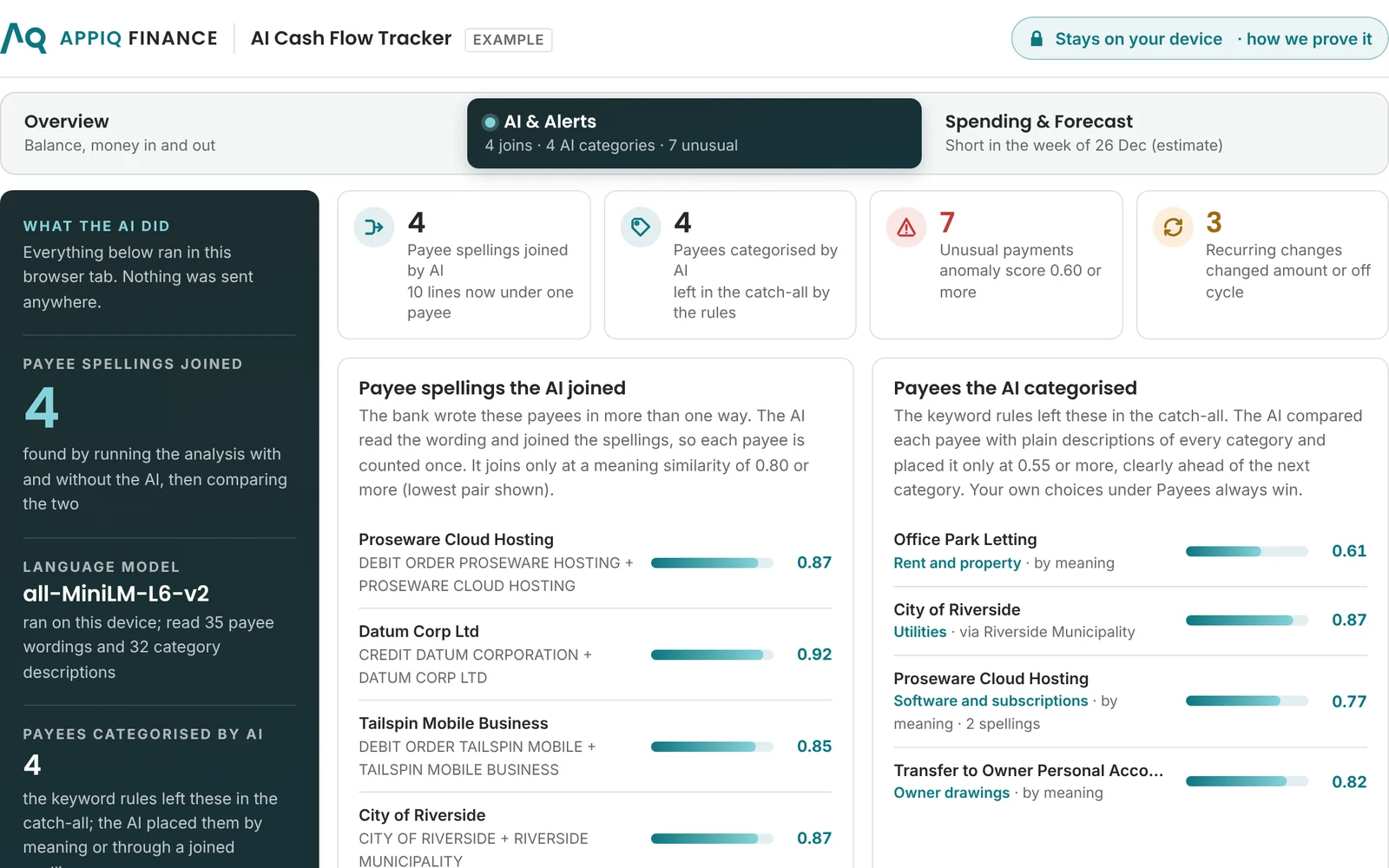
Yes, in three ways, all inside your browser. The language model (all-MiniLM-L6-v2) joins payees the bank wrote differently, so each is counted once and recurring payments are found, and it places payees the keyword rules leave in the catch-all into a category by meaning; the screen counts both by running the analysis with and without the AI. And an Isolation Forest, trained on your statement, ranks unusual payments, such as a recurring payment that jumped in amount or arrived off cycle, with the reasons. Your own category choices always win.
What does it cost?
AI Cash Flow Tracker Pro is $1,997 once-off for one organisation, any number of its own staff, no subscription. There is no free version: you can see the whole product on the built-in example statement before you buy, and your own statement loads once your key is activated.
Is it the same licence as AI Bank Match?
No. AI Cash Flow Tracker Pro, AI Bank Match Pro and AI Supplier Match Pro are separate once-off licences, each for one organisation. Each can be seen on its own example files before you buy.
Keep the cash controls in Excel
AI Cash Flow Tracker shows where you are. These AppIQ Excel Systems run the control process.
Cash Flow Forecasting & Liquidity Control System
$697 one-time. A rolling weekly forecast in Excel with minimum-buffer and loan covenant breach tests, sign-off and variance review.
See the Cash Flow SystemCredit Control & Receivables System
$497 one-time. Ageing, chase lists and promise-to-pay tracking, so the money in arrives when the forecast expects it.
See the Credit Control System